Showing posts with label documentation. Show all posts

Friday, May 5, 2017

QR Codes in Kindergarten


We have moved our blog to a new website.
To read this blog and more, please visit:


This year we have explored some new ways to use QR codes in our classroom. We are excited about some of the possibilities in the unique ways that they can be easily incorporated!


What is a QR code?

It is machine-readable code consisting of an array of black and white squares, typically used for storing URLs or other information for reading by the camera on a mobile device.

We have used QR codes in 3 different ways so far this year. We do want to ensure that these QR codes are by no means a substitute for human interaction. We love spending time reading with children and providing opportunities for rich conversations. They are simply another tool that we have found to be interesting and helpful in engaging students.


QR Codes: Student Voice in Writing
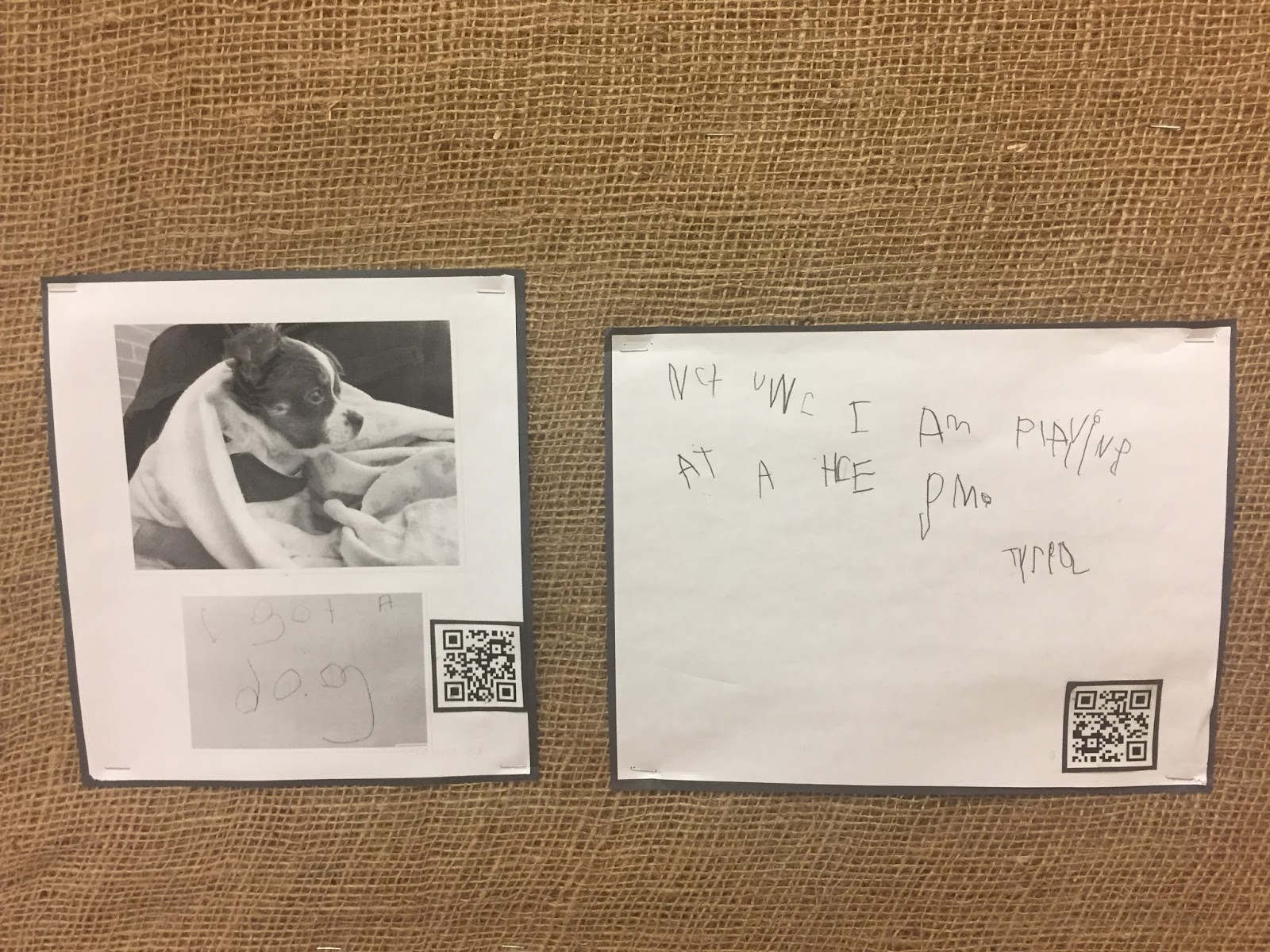


We have a "What's New" board in our classroom. When something exciting happens at home or school, we support students in writing about their experience to share with their peers. It creates a great conversation starter and supports students in engaging in writing about something that is of interest to them. Children have written about their new pets, family trips, learning something new at school, or celebrating their birthday.

We support children in their writing and developmentally it looks very different for each student. To add more detail and depth, we gave children an opportunity to record their story. We then add the QR code to their picture, photograph and writing.


QR Codes on Documentation


Each student in our room has a portfolio with documentation that is meaningful to them. We also document students conversations, explorations and experiences daily. When we add documentation to their portfolios or on the wall in a panel, they often invite us to read it to them. 

To support this we have started to record some of our pieces. We will read what we have written (whether it is a story of their learning or a group conversation) and then create a small QR code to add to the documentation. Students can then use the QR code to hear their learning stories anytime.


QR Codes: Listening to Favourite Stories


It can be expensive to purchase books for a listening centre. Sometimes we are limited by what we purchase too! There are so many great apps that have books for children to listen to, but we have found another neat way to support this!

We will record a story that we have read as a class or a nonfiction text that we are using for an investigation. We then add a photo of the book and the QR code so that students can easily scan the code to hear it read aloud to them.


The "How To":


1. Record an Audio File:

  • You can record an audio file many different ways, you have to find what works best for you!
  • We use the built in speaker in our computer and the web based audio recorder Vocaroo http://vocaroo.com/
www.vocaroo.com (one website option to record Audio)

After stopping recording, click to "save"


2. Save the Audio File to your device or computer.


Download as MP3


3. Load the File to Google Drive
  • we created a folder in google drive called "QR codes"
  • You can use other file sharing programs (such as Drop Box) too.


4. Make the link Public:
  • change settings to make the link public (or so that your students can open it, depending on your school and boards privacy settings)
  • Copy the Link


5. Create a QR code:
  • using any QR code generator, copy and paste the link in!
  • QR Code Generator: http://www.qr-code-generator.com/


Thursday, March 30, 2017

Relationships: The Foundation to Documenting


How many times have you been in the classroom with your iPad or notebook in your hands ready to write or document….and 30 minutes later it’s blank?


Or how about when you join in play and the moment you begin to write the children leave? It’s okay it happens to all of us!


Even this year, in our 5 year of teaching with one another we felt as though we were hitting a roadblock at times. Yes, there are always certain kids that naturally hook you in and are interesting to document. Although on the flip side it’s also interesting to think and reflect on ... where am I spending all my time? And who am I naturally gravitated towards?


There was a small group of girls that were new to school and seemed to bond quickly with one another. They communicated with each other far more than their interactions with any adults in the room. A place of interest for them was often in the house centre.


As we observed from afar their play appeared intentional in terms of materials, conversations and problem solving. Once our classroom began to settle in terms of routines, we both attempted to spend time with this group. After multiple attempts, blank pages and the girls shying away from us we couldn’t understand why.


Reflecting on our noticings we saw consistency in that they would look at or notice our clipboard or iPad and quickly become quiet. It wasn’t until quite recently, after March Break, that we have finally been able to capture their learning, conversations and wonderings.


We wanted to write a blog to go deeper in our reflections about why this may be happening and some strategies that will continue to support our learning on this journey.


Relationships Are Everything!
Throughout the year we are constantly trying to balance all the elements to teaching. We want to “check” things off, keep things moving and hope we can provide our students with the best start and experience to education.


All of us know this feeling or pressure! What we have noticed over time is that what we needed to do more was build genuine connections and relationships with the children without all of the documentation tools.


If we join in their play with a specific intention (such as how high can they count) then we are already creating our own road blocks and we continue to accumulate a bunch of missed opportunities for rich, open ended documentation.


Our starting point should be taking the time to play games, asking questions, finding out what some of their likes and dislikes are all things that build trust, respect and comfort.


After a holiday, such as March Break, it is sometimes important to scale back to rebuild and refocus with these relationships before bringing out our documentation tools too.


Trust, Respect and Comfort


As relationships evolve over time children will become more settled in their environment. Children can feel the energy that we bring when we join them and if we don’t establish this connection it could be one of the reasons play is shutting down, conversations are limited and perhaps why we find it is hard for us to even find a starting point.


Imagine having someone in your classroom that you don’t know well or someone you don’t feel connected to watching you and writing on a piece of paper. It’s intimidating and may even imply a sense of “testing” which could elicit anxiety in some children.


Instead, take the time to join in on the play and involve the children in the process of documenting. Teach them that their learning is valuable and decide together how it may be used, seen or accessed in the classroom.


By involving them it can open up conversations and also eliminates assumptions of their learning by becoming objective using quotes directly from the children. It also allows the children to recognize their key and growth learning.


We have learned that sometimes it is challenging to capture everything that is happening in the context of play. If we are having a hard time writing everything down in the moment we may say to the children “Can we record this?” and simply record the audio or video of the play and then transcribe later.


Our Reflection
Each year we grow more confident and comfortable in defining our own style of documenting and capturing learning. In fact, each year it evolves and becomes more natural for us. However, we truly believe that the time invested in relationships is a big piece of WHY we are able to capture and put together pieces about the children’s learning.


It can be frustrating, but take a deep breath and reminder yourself that learning is always reappearing and always happening. We cannot always see, hear or capture everything but we can take the time to build genuine connections and foster a love for learning in hopes that we can all grow together.


Thursday, June 30, 2016

Another Piece of the Puzzle: Documentation Panels

We have moved. To read this blog and others, please visit our new website:


Documentation can be a very overwhelming topic and learning process for all educators...mostly because we are constantly searching for a "how to" or a formula to guide us towards perfecting our skills in documentation.

We started a series on documentation last May, thinking carefully about the similarities and differences in how educators approach documentation. We have had rich conversations about development, age, setting (school, childcare, home). We are still thinking through the complexities and how documentation aligns with reality in Full Day Kindergarten.

As we continue to reflect on this complex topic, we have shared some of our learning about portfolios (Blog about Portfolios) and digital documentation (Blog about SeeSaw).

One form of documentation that we have found particularly engaging for the students in our room this year has been documentation panels. 

What is a Documentation Panel?

A documentation panel is a collection of artifacts, documentation pieces, drawings, photographs that tell a story and make learning visible.

Why are they such a valuable from of documentation?
  • childrens work is made visable
  • they provide an opporuntity for children to make connections to their experiences and learning
  • children are able to revisit text or photos to support them in retelling or recreating their learning
  • it provides children with an opportunity to share their theories and thought process
  • provides an opportunity to furhter conversations (between students or students and educators) - often leading to further wonderings, discoveries, and exploration


What is included in a panel?
  • photographs
  • sketches
  • documented conversations
  • writing samples
  • documentation pieces 

Things to consider when putting your panel together:
  • height: if the audience is children, is it at their eye level? 
  • "text" heavy documentation or recorded conversations may be included, but their intended audience would likely be educators or adults (could be placed higher on panel)
  • our students gravitate towards large photographs and visuals
  • how might the students interact with the documentation panel? could it be interactive? 
  • it is beneficial to involve children in the creation and construction of the panel 

Wind Panel


This panel was created during out wind project. Taking a quick glance at it you can see that the text heavy documentation pieces are located at the top of the panel. We chose this because the audience that would be interacting with those pieces more frequently are adults and educators who come into our classroom (e.g., parents during our monthly open house, other educators/administrators or visitors to our classroom). 

At the bottom of the panel you can see that the learning is more visually appealing. Developmentally it is easier for the children to interact with images and intentionally limited text.


Ramp Panel
This is another example of a documentation panel that was created in our classroom. This panel was co-constructed with the children. It is placed at the bottom of the bulletin board and close to the building area to ensure that children could easily interact with it.

After recognizing an interest in the construction of ramps, we began to document the children's explorations noticing the complexity of their ramps growing over time. We encouraged the children to document their construction and ramps using the iPad. As we printed each photo, the children would add it to the panel and many conversations came up while looking at their learning. The children were often using language to describe whether the ramp was easy or difficult.

The children added their ideas about the difficulty level using sticky notes and interacting daily with the panel.


It was really interesting to listen to the conversations that arose based on the panel. The children would often stand beside the wall and discuss strategies, theories and wonderings. They were asking each other questions and for support. They were explaining their thinking using real visuals from the classroom. It was truly evident that they were engaged with what was on the walls. 


How long does a documentation panel stay up?

When things on your wall become wallpaper and the children don't interact with them, remove them! Whenever we are unsure about something on our walls, we ask ourselves ... are the children still interacting with it? Are we still adding and reflecting on what is up?

If you notice that children are no longer interacting, talking about and using what is there on the wall it may be a good indication that it can come down. That doesn't mean you have to get rid of it completely! Perhaps it can be added to a project binder, a portfolios, or your book area?


Wednesday, May 4, 2016

Portfolios in Full Day Kindergarten

We have moved. 
To read this blog and others, please visit our new website:


For the past 5 years, we have used portfolios in our Kindergarten classroom. Although we supplement our portfolios with digital documentation (e.g., SeeSaw and Twitter), we feel as though the physical portfolio is a valuable part of our program.

What does our portfolio look like?
We use a black binder with children's name on the edge. Inside each portfolio is a collection of children's documentation pieces and some carefully selected pieces of work (or photographs) in plastic sleeves which allows for it to be easily updated.


Who is it for?
The portfolio is created for and with the children. That being said, each month when we host Open House for families it provides an opportunity for children to share their learning. 

We do NOT include any assessment data in our portfolios since their primary purpose is for the children. All of our assessment information is collected seperately and use by educators for the purposes of planning.

Involving children in the process of their documentation by asking them questions or
encouraging them to document their thinking.


What is the purpose of the physical portfolio?
Everything is becoming digital, which is amazing! Depending on your classroom and the different levels of access to technology digital portfolios may be the best fit for your students.

The purpose of the portfolio is to make visible the children's learning and to create an artifact that they can reference and reflect on. The children's portfolios capture their development, learning, growth and reflections. 

Watching children interact with their portfolios is a powerful experience. They retell their learning experiences, make connections to their play, and use their documentation to support their learning.

It is also incredible to listen to the conversations that children have when interacting with their portfolios. They are very self aware of their growth and development especially when reflecting on their experiences in their first compared to second year.

"It used to be hard for me"
"I learned..."
"Look at my learning..."
"Remember when..."

Having the portfolio in physical forms allows for the children to access it independently and easily. Other children can look at their peers portfolios as well, which is especially comforting in the fall for new students. We often notice students sharing their portfolio with new students who arrive part way through the year too.

Children often use Pic Collage to write and document their learning and experiences.


How can we afford to print documentation and keep up these binders?
That is the most common question we get when sharing these beautiful binders at workshops! We do not always print pieces of documentation in colour. Our rule of thumb is that if the piece is better understood in colour, then we may print it that way. Many of our documentation pieces are printed in black and white at school.

In addition, we share how valuable and important the portfolios are at the beginning of the year with families and ask them to contribute $5 towards the cost of the binder and the plastic sleeves.

Student writing about the process of her construction on the light table.

Friday, February 26, 2016

Documentation via Seesaw in FDK


We have moved our blog to a new website.
To read this blog and more, please visit:


"At the end of the day, the most overwhelming key to a child's success is the positive involvement of parents" - Jane D. Hull

Documentation continues to be the area that we reflect on, refine, and refocus ourselves on. Keep up with documenting children's discoveries, learning, ordinary moments, and joy can be a challenge in the classroom!

We have always used Noteability to document conversations, learning, project work and small group instruction. In addition to Noteability, we often use Pic Collage and Pages to create pieces of documentation for children's portfolios.

For the past few years we have also used Twitter and more recently Facebook as social media tools to share photographs, videos, and documentation with families. Once a month, we invite families into our learning environment after school to explore the classroom, read documentation, and look through their children's portfolios.

Although we had some success using Twitter, a colleague encouraged us to check out Seesaw. We had been meaning to test and try the new app for a while and we are so glad that we gave it a chance!

What we have learned through our trial and error is that there are so many options for capturing children's learning. After starting with Seesaw, we have reflected and now collect information using a few different tools:

  • Noteability: to record and organize longer conversations in project work, to record Knowledge Building Circles, to assessment make notes during small group instruction (only educators have access to Noteability)
  • Pic Collage/Pages: to create pieces of documentation for or with children for their portfolios
  • Seesaw: to communicate learning with families through pictures, notes, and videos (both educators and children use)
  • Twitter: to continue to connect with families and the greater community (e.g., other educators, other K classrooms, authors etc).


Seesaw has been an incredible addition to our "bank" of documentation tools. We have had the majority of our families sign up for Seesaw and their feedback has been incredible! Families have shared that they prefer it to other forms of social media as well!


What is Seesaw?
  • a digital app to collect, share, and organize student's thinking and learning
  • each child has their own "portfolio" digitally
  • pictures, videos, drawings, notes, and links can be added
  • journals are organized by students and subject areas can be added 
  • students can scan QR code to access their journal
  • http://web.seesaw.me/
  • Twitter: @Seesaw

Building a Connection with Families:
  • provides families with real time notifications on their mobile devices when something is added to their child's portfolio
  • parents are able to see the learning that is happening daily in the classroom and comment or connect
  • parents are able to comment on entries to provide feedback or encouragement

Benefits and Features of Seesaw:
  • multiple educators are able to access and add to the portfolios (teacher and DECE team, planning time teacher, administration)
  • very quick and easy to set up (and use!)
  • very user friendly (lots of great guides online and #seesawchat on Twitter)
  • secure way to share with families (only parents of that child have access to their portfolio)
  • keeps all of the incredible photographs that you take to capture learning (in 1 place!)
  • educators can "tag" more than 1 child in a photograph or piece of documentation (e.g., same picture or story will go into multiple portfolios)
  • provides a well rounded collection of information when it comes time to writing report cards, parents are already aware of the learning that took place too!

Getting Started:

1) Build Your Class: add students (by clicking on manage class, then manage students), change icon (if you click on individual students you can change their portfolio from icon to a photograph of them)


2) Add student learning
  • in Kindergarten: we add photographs and videos of learning with anecdotal notes for families. This has provided not only a window into the classroom, but education around the power of play based learning and project work.
  • students can capture their thinking and learning to share with their family
  • simply click on the green "+" sign to add to children's portfolios

3) Create folders to organize learning:
  • In Kindergarten - we have created our own folders to organize information. We often click more than one subject/area (e.g., literacy and math)
  • educators can customize the folders to include different strands of subjects or anything that will support their organization


4) Invite Families and other Educators to Join and Connect
  • You can invite parents via email or you can print a page that will have all of the instructions for parents to download the app and get connected (Seesaw is so incredible that they write the note for you, just have to print it out!)
  • Invite other educators to join in contributing or simply following (how great is it that planning time, special education or resource teachers can follow what happens when they are not there!)


This app has so much potential and we are sure that we are just beginning to experience the benefits of it! Some of our colleagues are experimenting with it in the classroom in primary and junior grades. Some use it just for themselves to collect evidence of student learning and success, others have opened it up to share with students or families. 

Hopefully this post will inspire more educators to give it a try! We were very happy with the tools that we had to document, in fact we were comfortable and unsure if we needed something NEW. Seesaw has been a great addition to our collection of tools and we are glad to be using it!